Enter your EK333 account and resume play

Login is the key to your personal space on Casino EK333. After you sign in you can manage deposits in BDT via bKash or Nagad, track betting history, claim bonuses and use all security tools like 2FA. This guide explains where to find the EK333 login button, how to enter from desktop or phone, what to do if you forget your password and how to keep your account safe when you play from Bangladesh.

Why EK333 login matters

When you log in to Casino EK333 you open full control over your profile instead of just browsing games. Only after a successful sign in you can:

  • See real balance in BDT and active bonuses
  • Deposit and withdraw through bKash, Nagad, Rocket or bank transfer
  • Check betting record and account record with every transaction
  • Join tournaments, cashback events and VIP program
  • Contact support with verified identity

Without login you only see demo parts of the platform. Stable access to your account also protects your money, because every action is linked to your verified profile and device.

Where to find the login button on the site

On desktop version the Login button sits in the top right corner of the main navigation bar next to the Register button. It is visible on every section - casino, sports, promo or help center.

On mobile browser the same button is in the header too, but sometimes hidden under a menu icon. Tap the three lines icon, then you will see Login and Register at the top of the side panel. This layout is the same for players from Dhaka, Chittagong or any other city, so you do not need to search long.

Once you press Login, the system opens a compact form where you choose phone or social account and enter your password.
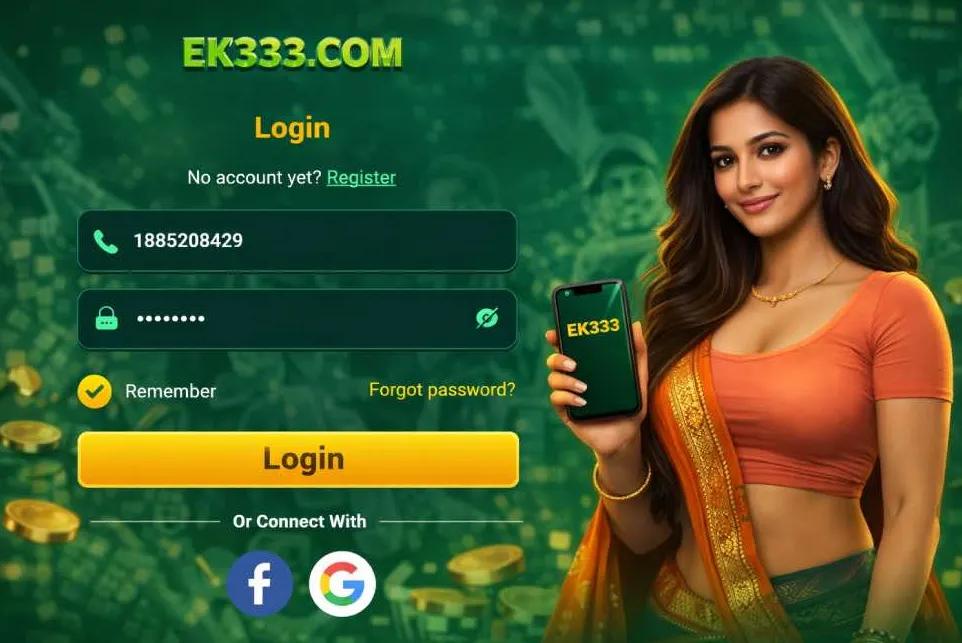
Open EK333 login form
Login button on EK333 header

On the EK333 homepage press the Login button in the top right corner to open the sign in form.

Structure of the EK333 login form

The EK333 login form is designed around mobile users in Bangladesh, so the main method is phone number. The layout is simple and stays the same on web and in the Android app.

Main fields and options

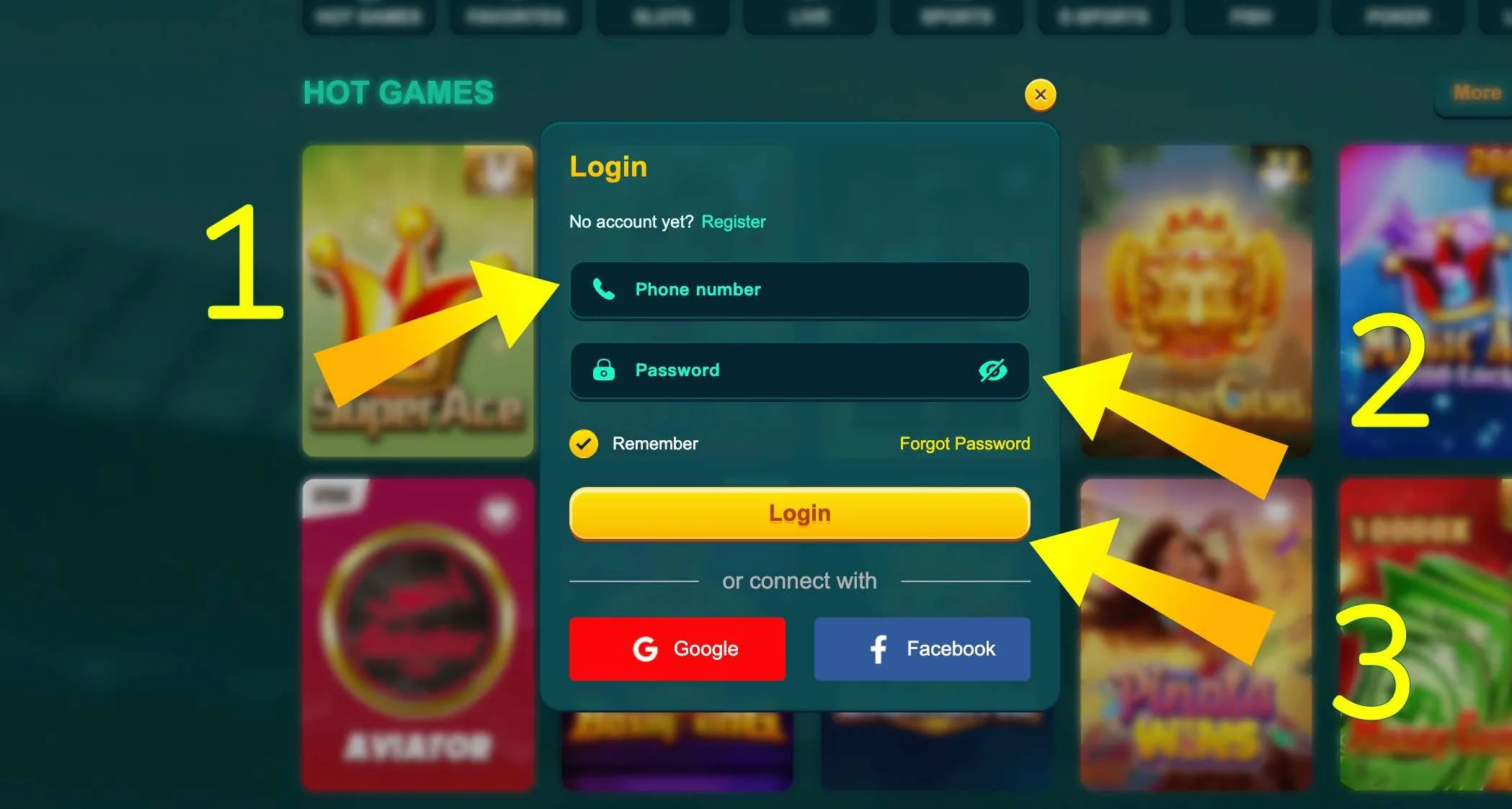
On the standard login screen you will see:

  • Phone number field - enter your Bangladeshi mobile number without country code prefix, usually 11 digits
  • Password field - 6 to 12 characters, English letters and digits only
  • Eye icon - show or hide password, useful in noisy places
  • Remember me switch - keep you signed in on this device
  • Login button - send your data to the server
  • Social buttons - fast entry via Google or Facebook profile

If you use 2 factor authentication, after pressing Login EK333 will ask for a one time code from SMS or email. Only after that you reach the main lobby with slots, live tables and sports line.

EK333 login form fields

The EK333 sign in form has phone, password, remember option and social login through Google or Facebook.

Already have an EK333 account but closed the tab earlier - just open the login form again and continue from the exact point where you stopped.

Step by step EK333 login from desktop

Logging in from a laptop or PC is convenient when you want to analyse betting stats or use several windows at once.

Desktop login walkthrough

  1. Open the official EK333 domain in your browser on Windows, macOS or Linux.
  2. Check the address line for https and the secure padlock icon.
  3. Click Login in the top right corner.
  4. Type your 11 digit Bangladeshi mobile number in the first field.
  5. Enter your EK333 password in the second field and use the eye icon if needed.
  6. Decide if you want the site to remember you on this computer and tick the option.
  7. Click the Login button and wait a couple of seconds.
  8. If you enabled 2FA, enter the code from SMS or email to confirm.

After that the site moves you to the lobby or last visited section. From there you can access casino, sports or home page overview with all main categories and promo banners.

If the system shows error, check if Caps Lock is off and that your keyboard layout is set to English before you try again.

Sign in from desktop now

Login through EK333 mobile app

Many players in Bangladesh prefer to log in through the EK333 Android app or iOS PWA, because it is faster than browser and does not depend on bookmark management.

Specifics of app based login

In the app the login icon is usually shown on the welcome screen, just above the game categories. Heart shaped balance and menu buttons sit nearby, so everything is reachable with one thumb.

When you tap Login the same phone and password fields appear. Extra features of the mobile client:

  • Automatic session restore - the app keeps you signed in until you log out
  • Local PIN or fingerprint protection on top of your EK333 password
  • Push alerts about logins from new devices, deposits and withdrawals

If your connection jumps between mobile data and Wi Fi while you are entering credentials, the app queues the request and sends it only when network is stable, reducing risk of half completed authorisation.

Recovering access if you forgot EK333 password

Sometimes players return to Casino EK333 after a break and cannot remember the exact password they used. The site includes clear tools to restore access without contacting support in most cases.

Reset methods and new password rules

On the login form you will find a small link like Forgot password or similar wording under the main fields. The general process looks like this:

  1. Tap the reset link on login screen.
  2. Choose recovery method - SMS to registered phone or email if you linked one.
  3. Enter the phone number or email address you used during registration.
  4. Receive a one time code or recovery link.
  5. Type the code into the form or open the link in your browser.
  6. Set a new password that follows EK333 rules.

Standard rules include 6 to 12 characters, only Latin letters and digits, no spaces and no special symbols. Avoid simple options like 123456 or your name. Combine at least one upper case letter with numbers, for example Dhaka88win, but do not repeat the same password on other sites.

If you changed phone number and lost access to the old one, support can help, but they will ask for extra KYC documents before changing login data.

If you have not logged in for a long time, reset your EK333 password first and then return to deposits and bonuses with a fresh and secure credential.

Two factor authentication and safety during login

Casino EK333 uses encryption and security checks to protect each login attempt, but players also control a lot of the safety.

How 2FA and device control work

When you activate two factor authentication in account settings, every new login requires an extra one time code in addition to password. EK333 can send codes by SMS or email, depending on your choice.

Key points:

  • New devices in Dhaka, Sylhet or abroad must be confirmed with code
  • Suspicious IP changes can trigger a temporary lock until you verify identity
  • The system logs all recent login attempts in your account record section
  • You can sign out from all devices at once through Personal Center if you feel risk

Do not share SMS codes on social networks or messengers and avoid logging in from public Wi Fi spots in cafes or bus stations without VPN. Also do not store your EK333 password in screenshots inside the same phone where you play.

EK333 protects every login with SSL encryption and supports two factor authentication for accounts from Bangladesh.

Secure your EK333 profile

Common EK333 login problems and quick checks

Even with proper credentials some players face issues while entering the platform. In most cases reasons are simple and can be fixed without waiting for support.

Typical errors and solutions

The table below shows frequent login problems and first steps to try.

Situation What to check and do
Wrong password Make sure Caps Lock is off, layout is English, then reset password if needed
Account locked Wait a few minutes, then reset via SMS or contact support for review
Code not received Check signal, wait up to 2 minutes, then resend or switch from SMS to email
App not opening Clear cache, update to latest version or use mobile browser instead
Login from new device Confirm 2FA code and check email for security alert

If problems stay longer than one hour, open live chat in Personal Center when you finally log in or write from the contact form on the main EK333 casino page. Describe the device, network type and exact error text.

After you solve login issues you can return to your usual routine - claim cashback, check Reward Center and continue playing without creating a new account.

Access after login: profile, payments and records

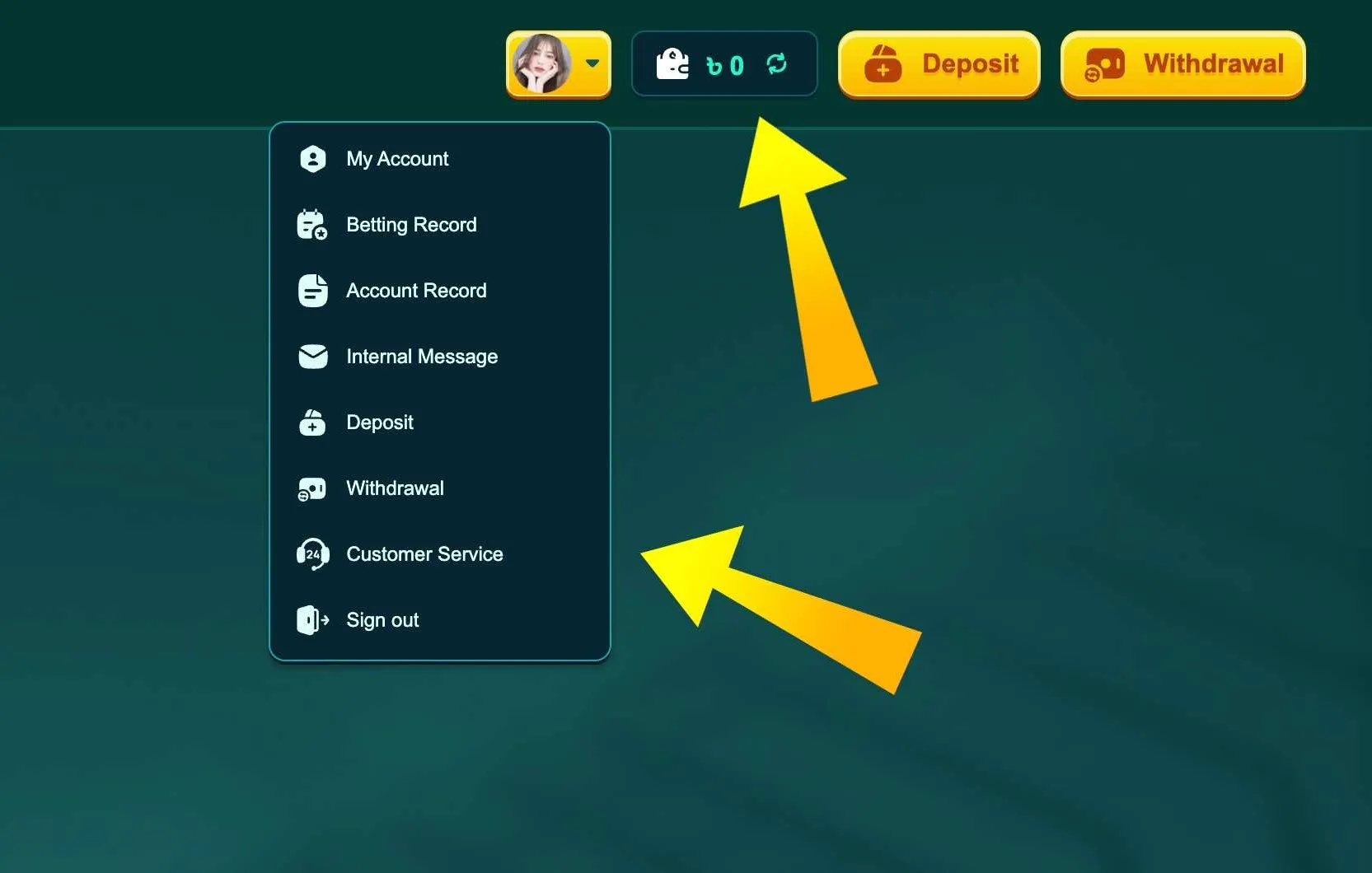
Once you successfully log in to Casino EK333 a profile menu opens under your avatar icon. From there you can move to sections like My Account, Deposit, Withdrawal, Betting Record and Account Record.

After authorisation you can:

  • Link or edit bKash, Nagad or Rocket wallets
  • Set transaction password for withdrawals
  • Review detailed profit and loss statistics by day or month
  • Open Reward Center with missions, vouchers and rescue funds
  • Adjust notification settings and enable or disable 2FA

These parts stay hidden for guests, so stable login is the base for any serious game session or long term betting strategy.

When you finish your play, always press Sign out in the profile menu, especially on shared computers in offices or internet cafes. On personal phones the Remember option is fine, but still log out if you plan to lend the device to someone else.

EK333 profile account menu

After you log in tap your avatar to open My Account, betting history, deposits, withdrawals and sign out option.

Log in and open your EK333 account

EK333 login FAQ

Can I log in to EK333 from several devices at the same time

Yes, technically you can stay logged in on phone and laptop together, but EK333 monitors unusual parallel activity. If the system sees different cities or countries at the same time it can trigger a safety check. For maximum security keep only your main devices authorised and log out from others in Personal Center.

What should I do if EK333 says my account does not exist

First check that you typed the correct phone number you used during registration. Many players mix numbers of dual SIM phones. If the login still fails, try to register - if the system says the number is already in use, contact support with that number so they can help restore access.

Why does EK333 ask for KYC after login

Sometimes after signing in you will see a request to upload NID or other documents. This happens when you reach certain turnover, request large withdrawals or change wallet details. KYC is required by the First Cagayan license and Bangladeshi digital rules to prevent fraud and protect both casino and players.

Is it safe to use the Remember me option on EK333

It is safe on your personal phone or home PC that no one else uses. The site still applies IP monitoring and 2FA if enabled. Do not use Remember me on work computers, university labs or any shared device, as other people could reach your account without password.

How do I log out from all devices at once

Open Personal Center after login, go to security or device section and use the function to terminate all active sessions. It will force every browser and app to ask for password again. Use it if you suspect that someone else had access to your account.

Can I log in to EK333 directly from the app without visiting the website

Yes, once you install the EK333 app on Android or add the PWA icon on iOS you can open it and use the built in login screen. There is no need to go through browser every time. The app keeps the connection to current mirrors even when the web domain changes.

What if I changed my phone number used for EK333 login

If you still have access to the old SIM, log in and update your number in account settings, then confirm via code. If the old SIM is lost, contact support from the new number and be ready to provide ID scan and maybe selfie to prove identity before they change login data.

Why does the SMS code for EK333 login sometimes arrive late

Mobile networks in Bangladesh can be busy during peak hours or in rural areas. Usually codes arrive within one minute, but sometimes it can take up to three minutes. Wait a bit, then request code again only once. If SMS never arrives, switch to email based codes if you have mail linked.